
Managing payments should not feel like a full-time job. Yet for many business owners, collecting payments, tracking transfers, verifying transactions, and monitoring cash flow can quickly become overwhelming.
One day, you are sending payment reminders on WhatsApp. The next day, you are checking bank alerts manually, updating spreadsheets, and trying to figure out which customer has paid and which one still owes you money.
This is exactly why the PayCape payment dashboard was built.
The PayCape payment dashboard provides businesses with a centralized workspace where they can collect payments, generate payment links, track incoming funds, monitor transactions, and gain better visibility into their finances from a single location. According to information available on PayCape’s platform, businesses can create payment links, receive collections through dedicated business accounts, and automatically track transactions without relying on manual processes.
In this guide, you’ll learn how to use the PayCape payment dashboard, explore its key features, and discover how it can help your business improve cash flow management and payment collection efficiency.
Getting Started with the PayCape Payment Dashboard
The first step is creating your PayCape workspace.
PayCape offers businesses a centralized financial management platform that combines payments, payroll, expenses, invoicing, budgeting, subscriptions, and reporting in one ecosystem.
Once your account is set up, you can access the PayCape payment dashboard.
Inside the dashboard, users can view payment collections, payment links, transaction activity, and payment tracking tools designed to simplify business collections.
The dashboard serves as your payment command center, giving you a clear overview of all incoming transactions.
Understanding the Main Features of the PayCape Payment Dashboard
The beauty of the PayCape payment dashboard is that it brings payment management into a single workspace.
Instead of switching between multiple applications, you can monitor everything from one screen.
Payment Collections
One of the most important features is payment collection management.
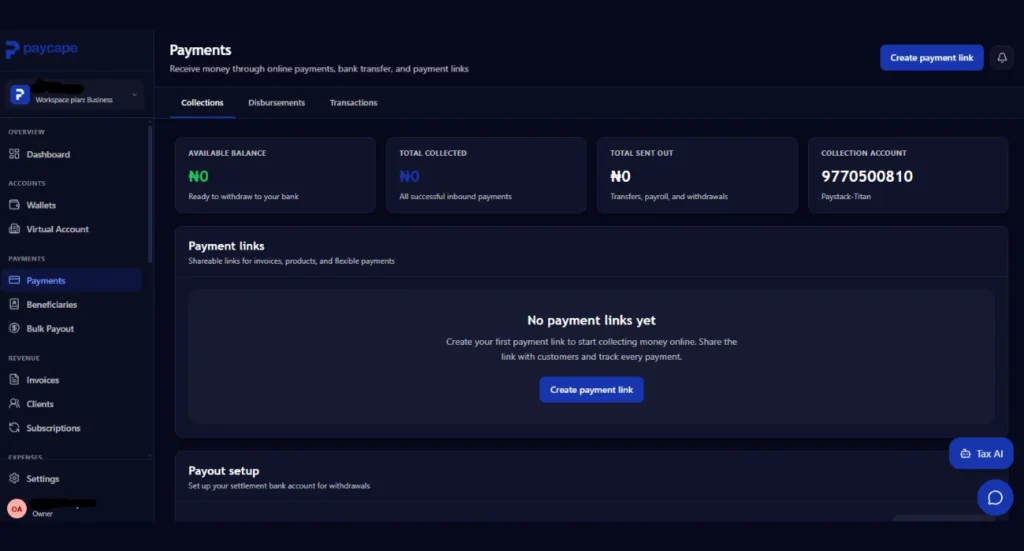
With PayCape, businesses can collect payments through dedicated business accounts and share payment links across their websites, social media platforms, WhatsApp, and email.
This enables customers to make payments easily, while the platform automatically tracks and records all transactions
For businesses that receive frequent payments, this reduces administrative work and improves transaction visibility.
Payment Links
Many businesses today sell products and services without operating a full eCommerce website.
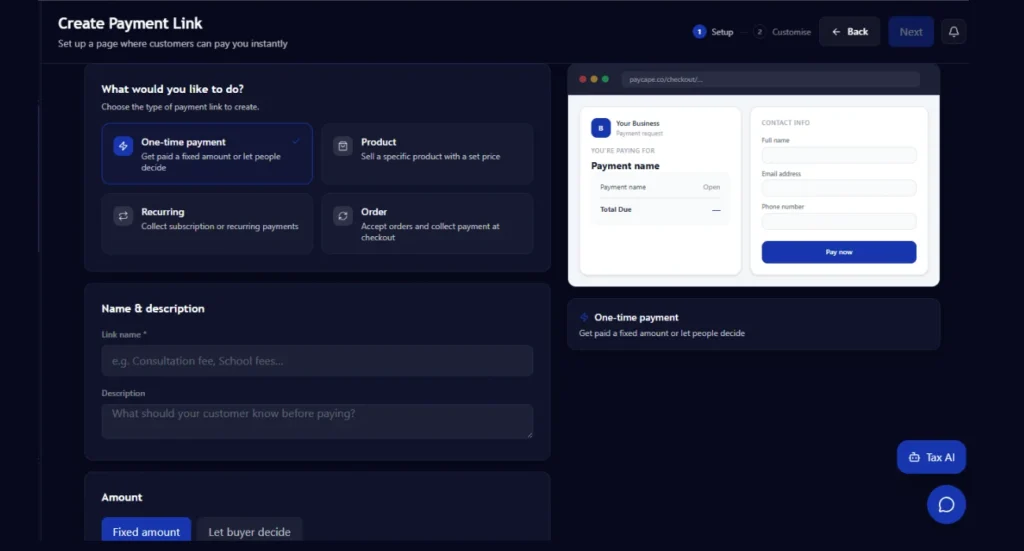
The PayCape payment dashboard allows users to generate payment links that can be shared with customers.
Imagine a freelance designer who needs to collect project deposits. Instead of requesting bank transfers manually, they can simply send a payment link.
The client clicks the link, completes payment, and the transaction appears on the dashboard.
This creates a more professional payment experience and can help businesses get paid faster.
Transaction Tracking
Tracking transactions is one of the most valuable features within the PayCape payment dashboard.
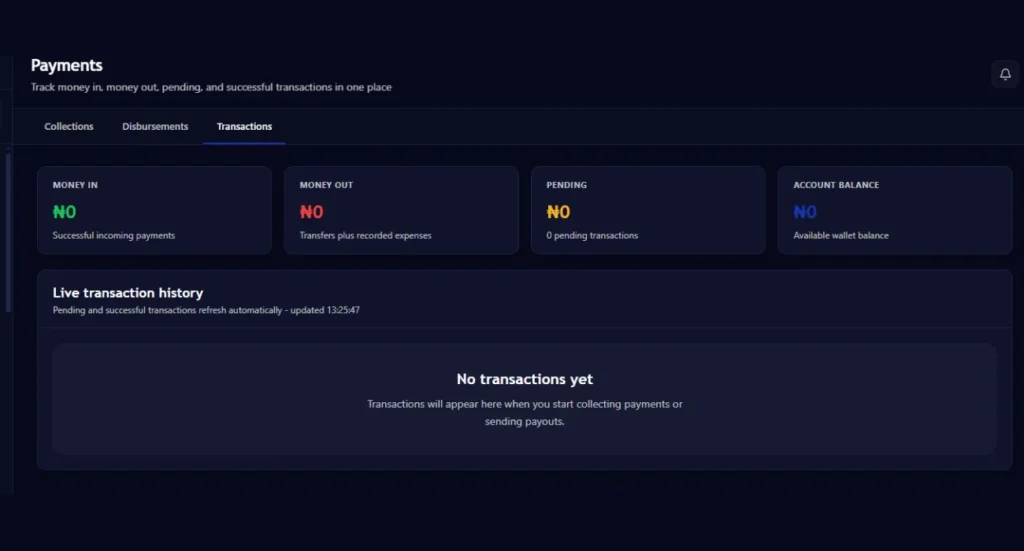
Every incoming payment can be monitored from a centralized location.
Rather than searching through bank statements or payment notifications, business owners can quickly review transaction activity and verify payments.
This improves financial visibility and helps reduce errors during reconciliation.
Payment Status Monitoring
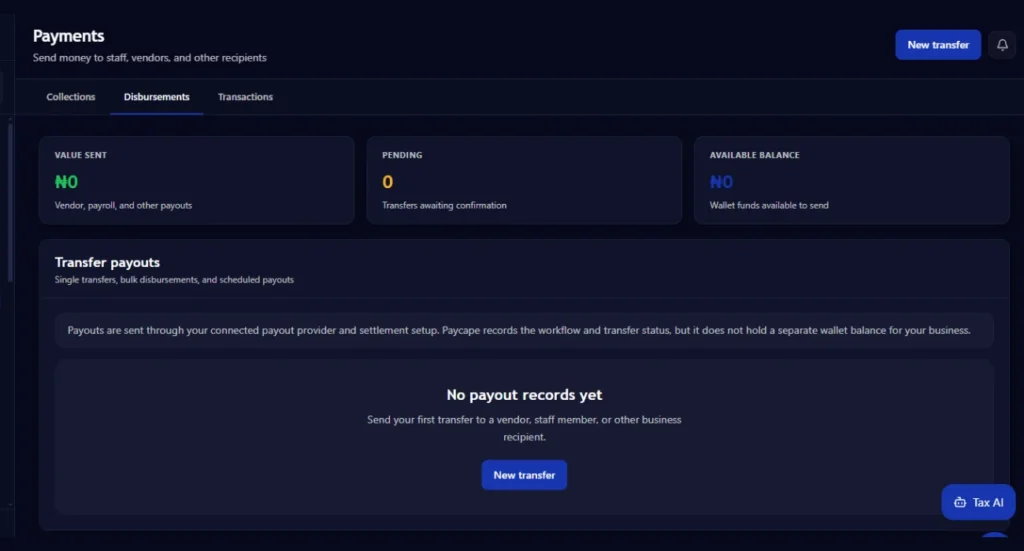
Businesses often need to know whether a payment has been completed, is still pending, or requires follow-up.
The dashboard provides visibility into payment activity, allowing teams to stay informed about payment progress.
This feature is particularly useful for service providers, consultants, agencies, and subscription-based businesses.
How Payment Collections Work in PayCape
You can collect payments easily through the PayCape payment dashboard.
The typical workflow looks like this:
- Create your payment collection or payment link.
- Share it with customers.
- Customers complete payment.
- Transactions are recorded automatically.
- Monitor payment activity from the dashboard.
This eliminates many of the manual processes traditionally associated with payment collection.
A business owner running online training programs, for example, can share a payment link with students and immediately track who has paid.
Instead of maintaining multiple spreadsheets, payment information remains organized in one system.
Improving Cash Flow with the PayCape Payment Dashboard
Cash flow is the lifeblood of every business.
Late payments can affect payroll, supplier payments, marketing budgets, and business growth plans.
The PayCape payment dashboard helps improve cash flow visibility by allowing businesses to monitor collections in real time and identify outstanding payments more efficiently.
Imagine running a small consulting firm.
You have ten clients paying different amounts at different times each month.
Without a centralized dashboard, understanding your cash position becomes difficult.
With the PayCape payment dashboard, you gain a clearer picture of incoming funds and payment activity, making financial planning easier.
Using PayCape Alongside Other Financial Tools
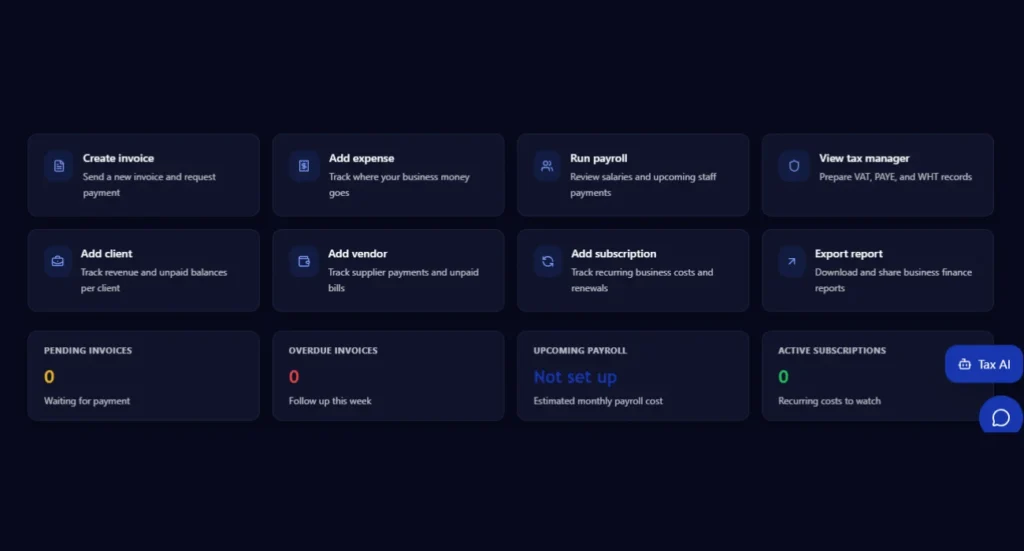
One of the biggest advantages of PayCape is that payments are only one part of the platform.
Businesses can connect payment management with other financial operations.
Payroll Management
After collecting payments, businesses often need to process employee salaries.
The PayCape Payroll tool helps businesses automate payroll calculations, generate payslips, and manage salary payments efficiently.
By combining payroll and payment collections, businesses gain greater control over their finances.
If you’re looking to simplify payroll operations and improve accuracy, you can also explore the complete guide on how to use PayCape for payroll management to learn practical steps for streamlining salary processing and workforce payments.
Expense Management
Managing expenses is just as important as collecting revenue.
PayCape’s expense management tool allows businesses to track spending, organize expense records, and improve financial oversight.
When used alongside the PayCape payment dashboard, businesses can gain a more complete view of their financial health.
Budget Management
Budgets help businesses control spending and allocate resources effectively.
PayCape’s budgeting tools support financial planning and spending control.
When payment collections and budgeting work together, businesses can make more informed financial decisions.
Subscription Management
For businesses with recurring revenue models, subscription management is essential.
PayCape offers tools that support subscription-based businesses and recurring billing workflows.
Combined with the PayCape payment dashboard, subscription businesses can manage recurring customer payments more efficiently.
Best Practices for Using the PayCape Payment Dashboard
To get the most value from the platform, businesses should follow a few simple practices.
Review Transactions Regularly
Set aside time each day to review payment activity.
Regular monitoring helps identify issues quickly and keeps records accurate.
Use Payment Links Consistently
Whenever possible, use payment links instead of requesting manual transfers.
This creates a smoother customer experience and improves payment tracking.
Organize Financial Processes
Take advantage of PayCape’s broader ecosystem by connecting payments with payroll, expenses, and budgeting.
This creates a more complete financial management system.
Monitor Cash Flow Trends
Use transaction data to understand payment patterns and identify opportunities for improvement.
The better your visibility into cash flow, the easier it becomes to plan for growth.
How the PayCape Payment Dashboard Supports Business Growth
As businesses grow, payment complexity increases.
More customers mean more transactions, more reconciliations, and more opportunities for administrative errors.
The PayCape payment dashboard helps businesses scale their payment operations without adding unnecessary complexity.
Whether you are a freelancer, startup founder, agency owner, consultant, or growing SME, having a centralized payment management system can save time and improve financial visibility.
A growing business should spend its energy serving customers and generating revenue, not chasing payment confirmations.
That is where a modern payment dashboard becomes valuable.
Frequently Asked Questions (FAQs)
What is the PayCape payment dashboard?
The PayCape payment dashboard is a centralized platform that helps businesses collect payments, create payment links, track transactions, and monitor payment activity from one location.
Can I share payment links with customers?
Yes. PayCape allows businesses to generate payment links that can be shared through websites, email, WhatsApp, social media, and other channels.
Is the PayCape payment dashboard suitable for small businesses?
Absolutely. The dashboard is designed for startups, freelancers, SMEs, and growing businesses that need a more efficient way to manage payments.
Can PayCape help beyond payment collection?
Yes. In addition to payments, PayCape offers payroll, expense management, budgeting, subscriptions, invoicing, tax management, reporting, and other financial tools.
Conclusion
Managing business payments does not have to be complicated.
The PayCape payment dashboard gives businesses a centralized way to collect payments, track transactions, monitor collections, and improve financial visibility. By combining payment management with payroll, expenses, budgets, and subscriptions, PayCape provides a complete financial operations platform for modern businesses.
Whether you are just starting out or scaling rapidly, PayCape can help simplify your financial processes and reduce the administrative burden of payment management.
Ready to streamline your collections and gain better control of your business finances? Visit PayCape today and create your account to start using the PayCape payment dashboard and other powerful financial management tools.