

Payroll is one of the most important responsibilities in any business. Employees expect to be paid accurately and on time, while business owners need to ensure salaries, taxes, pensions, and other deductions are calculated correctly.
Unfortunately, many businesses still rely on spreadsheets and manual calculations. This often leads to payroll errors, compliance issues, delayed salary payments, and unnecessary stress for business owners.
That is why many companies are now looking for better ways to manage payroll. If you have been searching for how to use PayCape payroll, this guide will walk you through everything you need to know.
PayCape is more than just a payroll tool. It is a complete financial management platform that helps businesses manage payroll, payments, expenses, budgets, subscriptions, and financial reporting from one place. Instead of using multiple systems, businesses can handle their financial operations through a single dashboard.
In this guide, you’ll learn how to use PayCape payroll, how it simplifies payroll processing, and how its other features can help your business operate more efficiently.
What Is PayCape?
Before learning how to use PayCape payroll, it helps to understand what the platform does.
PayCape is a business finance and payroll management software designed to help businesses automate financial tasks and improve operational efficiency. The platform helps organizations manage employee salaries, tax deductions, pension contributions, expenses, budgets, and payments without relying on manual processes.
For growing businesses, this means less time spent on administrative work and more time focused on serving customers and growing revenue.
Some of the key solutions available on PayCape include:
- Payroll Management
- Payments
- Expense Management
- Budget Management
- Subscription Management
- Financial Reporting
- Cash Flow Monitoring
Because all these tools work together, businesses get a complete view of their finances instead of working across multiple disconnected systems.
Why Businesses Struggle With Payroll
Payroll seems simple on the surface. Pay employees at the end of the month and move on.
In reality, payroll involves much more.
Businesses must calculate salaries, deduct taxes, manage pension contributions, process payments, maintain records, and generate reports. As teams grow, these responsibilities become increasingly difficult to manage manually.
Many small businesses experience challenges such as:
- Payroll calculation errors
- Late salary payments
- Missing employee records
- Incorrect tax deductions
- Compliance issues
- Time-consuming payroll administration
These challenges often become bigger as a business grows.
This is one reason why searches for payroll management software, payroll automation, and payroll software in Nigeria continue to increase. Business owners want solutions that save time and reduce costly mistakes.
Understanding how to use PayCape payroll can help eliminate many of these common payroll problems.
Getting Started With PayCape
The first step in learning how to use PayCape payroll is setting up your account.
Getting started is straightforward.

After creating an account, you’ll be guided through the process of entering your business information and configuring your payroll settings.
The platform allows you to create a centralized system where all payroll-related information can be stored securely.
This includes:
- Business details
- Employee records
- Salary structures
- Tax settings
- Pension configurations
- Payment preferences
Setting everything up correctly from the beginning helps ensure accurate payroll processing later on.
How to Add Employees to PayCape
Once your account is ready, the next step is adding your employees.
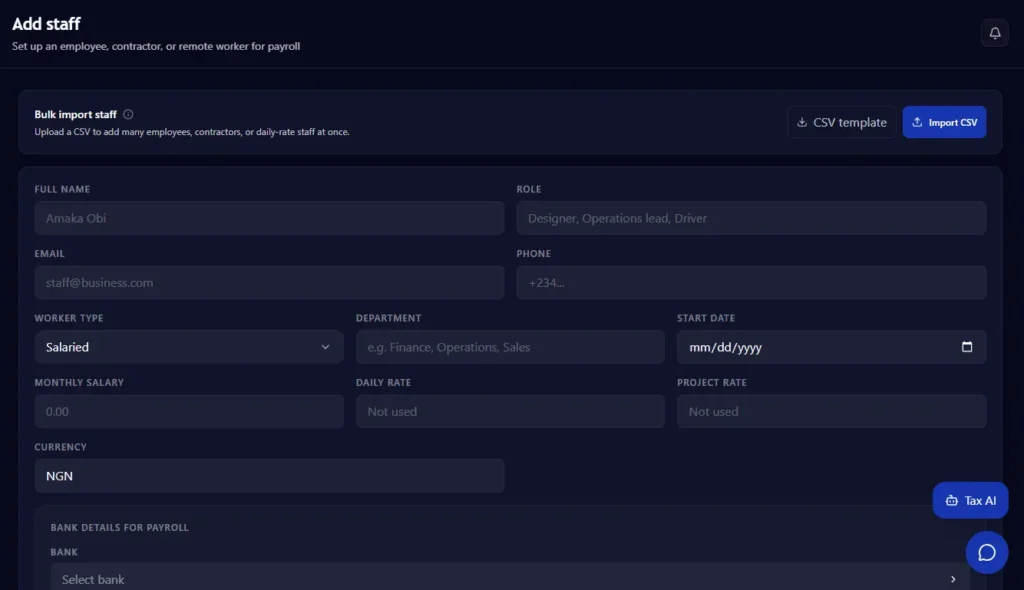
Employee information forms the foundation of payroll management. Accurate employee records help ensure salaries, deductions, and payments are processed correctly.
When setting up employee profiles, you can include information such as:
- Employee name
- Job title
- Salary details
- Bank account information
- Tax information
- Pension details
- Employment status
Having all employee data stored in one place makes payroll management significantly easier.
As your workforce grows, PayCape allows you to update employee records quickly without disrupting payroll operations.
How to Set Up Payroll
Now that your employees have been added, it’s time to configure your payroll structure.
This stage is one of the most important parts of learning how to use PayCape payroll because it determines how employee compensation is calculated.
You can define:
- Monthly salaries
- Bonuses
- Commissions
- Overtime payments
- Allowances
- Deductions
- Pension contributions
Once these payroll rules are configured, PayCape automatically applies them whenever payroll is processed.
This reduces manual calculations and improves payroll accuracy across the organization.
How PayCape Calculates Taxes and Deductions
One of the biggest challenges businesses face is calculating payroll deductions correctly. A small mistake can lead to compliance issues, employee complaints, or financial penalties.
This is where PayCape helps simplify the process.
As part of learning how to use PayCape payroll, you’ll need to configure the relevant deductions that apply to your employees. Once these settings are in place, the platform can automatically apply deductions during payroll processing.
Instead of spending hours working through calculations manually, businesses can rely on automation to improve accuracy and consistency.
This is especially helpful for growing businesses that want to reduce administrative work while maintaining proper payroll records.
How to Run Payroll in Minutes
After your employees and payroll settings have been configured, running payroll becomes a straightforward process.
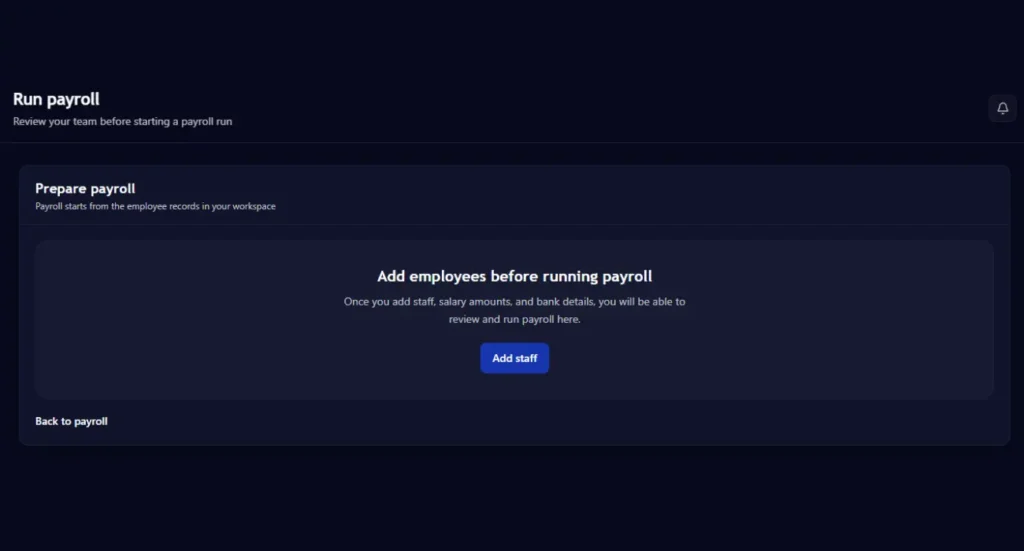
This is one of the reasons many businesses choose payroll automation solutions like PayCape.
Before processing payroll, review any updates that may affect employee compensation. These might include:
- New employees
- Salary adjustments
- Bonuses
- Overtime payments
- Employee exits
- Approved reimbursements
Once everything has been reviewed, you can generate payroll for the selected pay period.
The platform automatically calculates employee earnings and deductions based on the information already stored in the system.
Rather than spending hours updating spreadsheets, payroll can be completed in just a few steps.
For busy business owners, this can save valuable time every month.
How to Generate Payslips
Employees want transparency when it comes to their earnings.
Providing clear payslips helps employees understand exactly how their salaries were calculated and what deductions have been applied.
After payroll has been processed, PayCape makes it easier to generate employee payslips.
These payslips provide a detailed breakdown of:
- Gross salary
- Allowances
- Bonuses
- Deductions
- Net pay
Having organized payroll records also makes it easier to respond to employee questions and maintain accurate documentation.
For businesses focused on improving their employee payroll management, digital payslips are a major advantage.
How PayCape Payments Simplifies Salary Disbursement
Calculating payroll is only one part of the process. Employees still need to receive their salaries on time.
This is where PayCape’s payments solution becomes valuable.
Using the services available through PayCape Payments, businesses can streamline the payment process and manage salary disbursements more efficiently.
Instead of handling multiple payment processes manually, businesses can manage payroll and payments from a centralized platform.
This helps reduce delays and improves the overall payroll experience for both employers and employees.
For growing companies, combining payroll and payments in one system can significantly improve operational efficiency.
How PayCape Budgets Help Control Payroll Costs
Payroll is often one of the largest expenses in any organization.
Without proper planning, payroll costs can quickly affect cash flow and overall business performance.
That is why budgeting is an important part of payroll management.
PayCape’s budgeting solution helps businesses plan and monitor spending more effectively.
When payroll data and budgeting information work together, business owners gain better visibility into their financial position.
This can help businesses:
- Forecast future payroll expenses
- Monitor departmental spending
- Control operational costs
- Make better financial decisions
Businesses that actively manage payroll costs are often better prepared for growth and unexpected financial challenges.
How PayCape Expenses Improve Financial Visibility
Payroll is only one piece of a company’s financial picture.
Employee reimbursements, travel expenses, office supplies, and operational costs can all impact business finances.
PayCape Expenses helps businesses track and manage these expenses in one place.
Instead of relying on scattered receipts and spreadsheets, businesses can maintain organized records that support better decision-making.
This creates greater visibility into overall company spending.
When combined with payroll management, expense tracking helps businesses gain a more complete understanding of their financial health.
Many companies discover that using payroll and expense management together improves accountability across the organization.
How PayCape Subscriptions Help Manage Recurring Costs
Most businesses pay for multiple software tools and recurring services every month.
These expenses can add up quickly if they are not properly monitored.
Through a Paycape subscription, businesses can keep track of recurring payments and subscription costs from a centralized dashboard.
Managing subscriptions alongside payroll helps businesses maintain better control of cash flow and avoid unnecessary spending.
This is especially useful for startups and growing companies that need to manage resources carefully.
How PayCape Reports Help Business Owners Make Better Decisions
One of the most valuable aspects of learning how to use PayCape payroll is understanding the reporting capabilities available within the platform.
Payroll reports provide important insights into:
- Payroll expenses
- Employee compensation
- Payroll trends
- Business spending
- Financial performance
Having access to reliable financial data helps business owners make informed decisions.
Instead of relying on guesswork, managers can use real information to plan hiring, manage budgets, and support business growth.
Good reporting is one of the reasons businesses increasingly invest in business financial management software and payroll reporting software.
Benefits of Using PayCape Payroll
Businesses that use PayCape often experience benefits beyond payroll processing.
Here are some of the biggest advantages.
1. Saves Time
Manual payroll calculations can consume hours every month.
PayCape automates many of these tasks, allowing business owners to focus on more important priorities.
2. Reduces Errors
Payroll mistakes can be expensive and frustrating.
Automation helps improve accuracy and consistency.
3. Improves Employee Satisfaction
Employees appreciate receiving accurate salaries and payslips on time.
A smoother payroll process contributes to a better employee experience.
4. Centralizes Financial Management
Payroll, payments, budgets, expenses, subscriptions, and reporting can all be managed from one platform.
This reduces complexity and improves efficiency.
5. Supports Business Growth
As your company expands, PayCape grows with you.
Businesses can continue managing payroll effectively without needing to overhaul their systems.
Common Payroll Mistakes to Avoid
Even with modern software, businesses should still follow good payroll practices.
Some common mistakes include:
1. Failing to Update Employee Information
Outdated employee records can lead to incorrect payroll calculations.
Always update salary changes, bank details, and employment status promptly.
2. Waiting Until Payday
Leaving payroll until the last minute increases the risk of mistakes.
Review payroll information before processing each cycle.
3. Ignoring Payroll Reports
Reports provide valuable information that can help identify issues before they become major problems.
4. Managing Payroll and Expenses Separately
When payroll and expenses are disconnected, businesses often lack a complete view of their finances.
Using integrated tools can improve financial visibility.
Frequently Asked Questions
What is PayCape Payroll?
PayCape Payroll is a payroll management solution that helps businesses automate salary calculations, payroll processing, employee payments, and financial reporting.
Is PayCape Suitable for Small Businesses?
Yes. PayCape is designed to support startups, small businesses, and growing organizations looking for a simpler way to manage payroll and finances.
Can PayCape Help Automate Payroll?
Yes. One of the main benefits of learning how to use PayCape payroll is the ability to automate payroll calculations and reduce manual administrative work.
Does PayCape Offer More Than Payroll Management?
Absolutely. In addition to payroll, PayCape offers solutions for payments, budgeting, expenses, subscriptions, and financial reporting through a single platform.
Conclusion
Managing payroll doesn’t have to be stressful.
Many businesses start with spreadsheets and manual calculations, but these methods often become difficult to maintain as teams grow. Payroll errors, delayed payments, and administrative burdens can quickly slow down business operations.
Learning how to use PayCape payroll gives businesses a smarter way to manage employee salaries, payroll records, payments, and financial processes from one platform.
Whether you’re running a startup, a small business, or a growing company, PayCape helps simplify payroll management while providing greater visibility into your overall finances.
By combining payroll, payments, budgets, expenses, subscriptions, and reporting, PayCape enables businesses to spend less time on administration and more time on growth.
Ready to get started? Create your PayCape account today.